


Java OOP
Java Fundamental

<< < Previous Lesson < Java Tutorial > Next Lesson > >>

Secure: With Java's secure feature it enables to develop virus-free, tamper-free systems. Authentication techniques are based on public-key encryption.
Architectural Neutral:Java compiler generates an architecture-neutral object file format which makes the compiled code to be executable on many processors, with the presence of Java runtime system.
Portable: Being architectural-neutral and having no implementation dependent aspects of the specification makes Java portable. Compiler in Java is written in ANSI C with a clean portability boundary which is a POSIX subset.
Robust: Java makes an effort to eliminate error prone situations by emphasizing mainly on compile time error checking and runtime checking.
Multithreaded: With Java's multithreaded feature it is possible to write programs that can do many tasks simultaneously. This design feature allows developers to construct smoothly running interactive applications.
Interpreted: Java byte code is translated on the fly to native machine instructions and is not stored anywhere. The development process is more rapid and analytical since the linking is an incremental and light weight process.
Java is a general-purpose computer programming language that is
concurrent, class-based, object-oriented, and specifically designed to
have as few implementation dependencies as possible. It is intended to
let application developers "write once, run anywhere" (WORA),
meaning that code that runs on one platform does not need to be
recompiled to run on another. Java applications are typically
compiled to bytecode that can run on any Java virtual machine (JVM)
regardless of computer architecture. Java is, as of 2014, one of the
most popular programming languages in use, particularly for
client-server web applications, with a reported 9 million
developers.Java was originally developed by James Gosling at Sun
Microsystems (which has since merged into Oracle Corporation) and
released in 1995 as a core component of Sun Microsystems' Java platform.
The language derives much of its syntax from C and C++, but it has
fewer low-level facilities than either of them.
Java is:
>> Distributed
>> High Performance
>> Simple
>> Secure
>> Portable
>> Robust
>> Multithreaded
>> Interpreted
>> Architectural Neutral
Object Oriented: In Java, everything is an Object. Java can be easily extended since it is based on the Object model.
Platform Independent: Unlike many other programming languages including C and C++, when Java is compiled, it is not compiled into platform specific machine, rather into platform independent byte code. This byte code is distributed over the web and interpreted by virtual Machine (JVM) on whichever platform it is being run.
Platform Independent: Unlike many other programming languages including C and C++, when Java is compiled, it is not compiled into platform specific machine, rather into platform independent byte code. This byte code is distributed over the web and interpreted by virtual Machine (JVM) on whichever platform it is being run.
Dynamic:
Java is considered to be more dynamic than C or C++ since it is
designed to adapt to an evolving environment. Java programs can carry
extensive amount of run-time information that can be used to verify and
resolve accesses to objects on run-time.
Distributed: Java is designed for the distributed environment of the internet.
High Performance: With the use of Just-In-Time compilers, Java enables high performance.
Simple: Java is designed to be easy to learn. If you understand the basic concept of OOP Java would be easy to master.
Secure: With Java's secure feature it enables to develop virus-free, tamper-free systems. Authentication techniques are based on public-key encryption.
Architectural Neutral:Java compiler generates an architecture-neutral object file format which makes the compiled code to be executable on many processors, with the presence of Java runtime system.
Portable: Being architectural-neutral and having no implementation dependent aspects of the specification makes Java portable. Compiler in Java is written in ANSI C with a clean portability boundary which is a POSIX subset.
Robust: Java makes an effort to eliminate error prone situations by emphasizing mainly on compile time error checking and runtime checking.
Multithreaded: With Java's multithreaded feature it is possible to write programs that can do many tasks simultaneously. This design feature allows developers to construct smoothly running interactive applications.
Interpreted: Java byte code is translated on the fly to native machine instructions and is not stored anywhere. The development process is more rapid and analytical since the linking is an incremental and light weight process.
Java Loop
<< < Previous Lesson < Java Tutorial > Next Lesson > >>
Java Loop
<< < Previous Lesson < Java Tutorial > Next Lesson > >>
Java Loop
<< < Previous Lesson < Java Tutorial > Next Lesson > >>
Java Operator
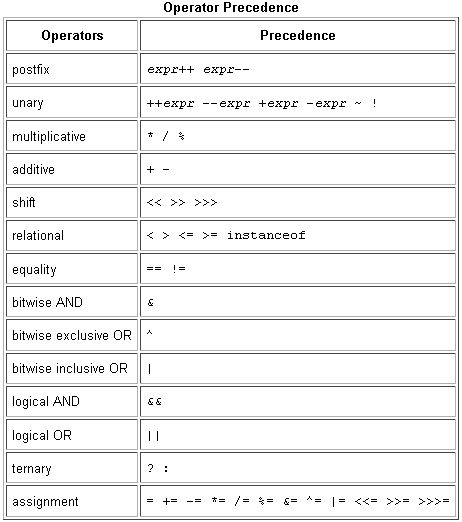
Operators in Java Programming Language
We have learned how to declare and initialize variables, you probably want to know how to do something with them. Learning the operators of the Java programming language is a good place to start. Operators are special symbols that perform specific operations on one, two, or three operands, and then return a result.
As we explore the operators of the Java programming language, it may be helpful for you to know ahead of time which operators have the highest precedence. The operators in the following table are listed according to precedence order. The closer to the top of the table an operator appears, the higher its precedence. Operators with higher precedence are evaluated before operators with relatively lower precedence. Operators on the same line have equal precedence. When operators of equal precedence appear in the same expression, a rule must govern which is evaluated first. All binary operators except for the assignment operators are evaluated from left to right; assignment operators are evaluated right to left.
Operator Precedence in Java Programming Language
| Operators | Precedence |
|---|---|
| postfix | expr++ expr-- |
| unary | ++expr --expr +expr -expr ~ ! |
| multiplicative | * / % |
| additive | + - |
| shift | << >> >>> |
| relational | < > <= >= instanceof |
| equality | == != |
| bitwise AND | & |
| bitwise exclusive OR | ^ |
| bitwise inclusive OR | | |
| logical AND | && |
| logical OR | || |
| ternary | ? : |
| assignment | = += -= *= /= %= &= ^= |= <<= >>= >>>= |
Assignment Operators in Java Programming Language
One of the most common operator is the simple assignment operator "=".| Operator | Description | Example |
|---|---|---|
| = | Simple assignment operator, Assigns values from right side operands to left side operand | C = A + B will assign value of A + B into C |
| += | Add AND assignment operator, It adds right operand to the left operand and assign the result to left operand | C += A is equivalent to C = C + A |
| -= | Subtract AND assignment operator, It subtracts right operand from the left operand and assign the result to left operand | C -= A is equivalent to C = C - A |
| *= | Multiply AND assignment operator, It multiplies right operand with the left operand and assign the result to left operand | C *= A is equivalent to C = C * A |
| /= | Divide AND assignment operator, It divides left operand with the right operand and assign the result to left operand | C /= A is equivalent to C = C / A |
| %= | Modulus AND assignment operator, It takes modulus using two operands and assign the result to left operand | C %= A is equivalent to C = C % A |
| <<= | Left shift AND assignment operator | C <<= 2 is same as C = C << 2 |
| >>= | Right shift AND assignment operator | C >>= 2 is same as C = C >> 2 |
| &= | Bitwise AND assignment operator | C &= 2 is same as C = C & 2 |
| ^= | bitwise exclusive OR and assignment operator | C ^= 2 is same as C = C ^ 2 |
| |= | bitwise inclusive OR and assignment operator | C |= 2 is same as C = C | 2 |
For example:
public class Demo {
public static void main(String args[]) {
int a = 10;
int b = 20;
int c = 0;
c = a + b;
System.out.println("c = a + b = " + c );
c += a ;
System.out.println("c += a = " + c );
c -= a ;
System.out.println("c -= a = " + c );
c *= a ;
System.out.println("c *= a = " + c );
a = 10;
c = 15;
c /= a ;
System.out.println("c /= a = " + c );
a = 10;
c = 15;
c %= a ;
System.out.println("c %= a = " + c );
c <<= 2 ;
System.out.println("c <<= 2 = " + c );
c >>= 2 ;
System.out.println("c >>= 2 = " + c );
c >>= 2 ;
System.out.println("c >>= a = " + c );
c &= a ;
System.out.println("c &= 2 = " + c );
c ^= a ;
System.out.println("c ^= a = " + c );
c |= a ;
System.out.println("c |= a = " + c );
}
}
Arithmetic Operators in Java Programming Language
The Java programming language provides operators that perform addition, subtraction, multiplication, and division. There's a good chance you'll recognize them by their counterparts in basic mathematics. The only symbol that might look new to you is "%", which divides one operand by another and returns the remainder as its result.
| Operator | Description |
|---|---|
+ | Additive operator (also used for String concatenation) |
- | Subtraction operator |
* | Multiplication operator |
/ | Division operator |
% | Remainder operator |
The following example, ArithmeticDemo, tests the arithmetic operators.
class ArithmeticDemo {
public static void main (String[] args) {
int result = 1 + 2;
// result is now 3
System.out.println("1 + 2 = " + result);
int original_result = result;
result = result - 1;
// result is now 2
System.out.println(original_result + " - 1 = " + result);
original_result = result;
result = result * 2;
// result is now 4
System.out.println(original_result + " * 2 = " + result);
original_result = result;
result = result / 2;
// result is now 2
System.out.println(original_result + " / 2 = " + result);
original_result = result;
result = result + 8;
// result is now 10
System.out.println(original_result + " + 8 = " + result);
original_result = result;
result = result % 7;
// result is now 3
System.out.println(original_result + " % 7 = " + result);
}
}
Output
1 + 2 = 3
3 - 1 = 2
2 * 2 = 4
4 / 2 = 2
2 + 8 = 10
10 % 7 = 3
You can also combine the arithmetic operators with the simple assignment operator to create compound assignments. For example, x+=1; and x=x+1; both increment the value of x by 1.
The + operator can also be used for concatenating (joining) two strings together, as shown in the following ConcatDemo program:
class ConcatDemo {
public static void main(String[] args){
String firstString = "This is";
String secondString = " a concatenated string.";
String thirdString = firstString+secondString;
System.out.println(thirdString);
}
}
By the end of this program, the variable thirdString contains "This is a concatenated string.", which gets printed to standard output.
Unary Operators in Java Programming Language
The unary operators require only one operand; they perform various operations such as incrementing/decrementing a value by one, negating an expression, or inverting the value of a boolean.
| Operator | Description |
|---|---|
+ | Unary plus operator; indicates positive value (numbers are positive without this, however) |
- | Unary minus operator; negates an expression |
++ | Increment operator; increments a value by 1 |
-- | Decrement operator; decrements a value by 1 |
! | Logical complement operator; inverts the value of a boolean |
The example program, UnaryDemo, tests the unary operators:
class UnaryDemo {
public static void main(String[] args) {
int result = +1;
// result is now 1
System.out.println(result);
result--;
// result is now 0
System.out.println(result);
result++;
// result is now 1
System.out.println(result);
result = -result;
// result is now -1
System.out.println(result);
boolean success = false;
// false
System.out.println(success);
// true
System.out.println(!success);
}
}
The increment/decrement operators can be applied before (prefix) or after (postfix) the operand. The code result++; and ++result; will both end in result being incremented by one. The only difference is that the prefix version (++result) evaluates to the incremented value, whereas the postfix version (result++) evaluates to the original value. If you are just performing a simple increment/decrement, it doesn't really matter which version you choose. But if you use this operator in part of a larger expression, the one that you choose may make a significant difference.
The following example, PrePostDemo, illustrates the prefix and postfix unary increment operator:
class PrePostDemo {
public static void main(String[] args){
int i = 3;
i++;
// prints 4
System.out.println(i);
++i;
// prints 5
System.out.println(i);
// prints 6
System.out.println(++i);
// prints 6
System.out.println(i++);
// prints 7
System.out.println(i);
}
}
Equality and Relational Operators in Java Programming Language
The equality and relational operators determine if one operand is greater than, less than, equal to, or not equal to another operand. The majority of these operators will probably look familiar to you as well. Keep in mind that you must use "==", not "=", when testing if two primitive values are equal.
== equal to
!= not equal to
> greater than
>= greater than or equal to
< less than
<= less than or equal to
The following program, ComparisonDemo, tests the comparison operators:
class ComparisonDemo {
public static void main(String[] args){
int value1 = 1;
int value2 = 2;
if(value1 == value2)
System.out.println("value1 == value2");
if(value1 != value2)
System.out.println("value1 != value2");
if(value1 > value2)
System.out.println("value1 > value2");
if(value1 < value2)
System.out.println("value1 < value2");
if(value1 <= value2)
System.out.println("value1 <= value2");
}
}
Output:
value1 != value2
value1 < value2
value1 <= value2
The Conditional Operators in Java Programming Language
The && and || operators perform Conditional-AND and Conditional-OR operations on two boolean expressions. These operators exhibit "short-circuiting" behavior, which means that the second operand is evaluated only if needed.
&& Conditional-AND
|| Conditional-OR
The following program, ConditionalDemo1, tests these operators:
class ConditionalDemo1 {
public static void main(String[] args){
int value1 = 1;
int value2 = 2;
if((value1 == 1) && (value2 == 2))
System.out.println("value1 is 1 AND value2 is 2");
if((value1 == 1) || (value2 == 1))
System.out.println("value1 is 1 OR value2 is 1");
}
}
Another conditional operator is ?:, which can be thought of as shorthand for an if-then-else statement (discussed in the Control Flow Statements section of this lesson). This operator is also known as the ternary operator because it uses three operands. In the following example, this operator should be read as: "If someCondition is true, assign the value of value1 to result. Otherwise, assign the value of value2 to result."
The following program, ConditionalDemo2, tests the ?: operator:
class ConditionalDemo2 {
public static void main(String[] args){
int value1 = 1;
int value2 = 2;
int result;
boolean someCondition = true;
result = someCondition ? value1 : value2;
System.out.println(result);
}
}
Because someCondition is true, this program prints "1" to the screen. Use the ?: operator instead of an if-then-else statement if it makes your code more readable; for example, when the expressions are compact and without side-effects (such as assignments).
The Type Comparison Operator instanceof
The instanceof operator compares an object to a specified type. You can use it to test if an object is an instance of a class, an instance of a subclass, or an instance of a class that implements a particular interface.
The following program, InstanceofDemo, defines a parent class (named Parent), a simple interface (named MyInterface), and a child class (named Child) that inherits from the parent and implements the interface.
class InstanceofDemo {
public static void main(String[] args) {
Parent obj1 = new Parent();
Parent obj2 = new Child();
System.out.println("obj1 instanceof Parent: "
+ (obj1 instanceof Parent));
System.out.println("obj1 instanceof Child: "
+ (obj1 instanceof Child));
System.out.println("obj1 instanceof MyInterface: "
+ (obj1 instanceof MyInterface));
System.out.println("obj2 instanceof Parent: "
+ (obj2 instanceof Parent));
System.out.println("obj2 instanceof Child: "
+ (obj2 instanceof Child));
System.out.println("obj2 instanceof MyInterface: "
+ (obj2 instanceof MyInterface));
}
}
class Parent {}
class Child extends Parent implements MyInterface {}
interface MyInterface {}
Output:
obj1 instanceof Parent: true
obj1 instanceof Child: false
obj1 instanceof MyInterface: false
obj2 instanceof Parent: true
obj2 instanceof Child: true
obj2 instanceof MyInterface: true
When using the instanceof operator, keep in mind that null is not an instance of anything.
Bitwise and Bit Shift Operators in Java Programming Language
The Java programming language also provides operators that perform bitwise and bit shift operations on integral types. The operators discussed in this section are less commonly used. Therefore, their coverage is brief; the intent is to simply make you aware that these operators exist.
The unary bitwise complement operator "~" inverts a bit pattern; it can be applied to any of the integral types, making every "0" a "1" and every "1" a "0". For example, a byte contains 8 bits; applying this operator to a value whose bit pattern is "00000000" would change its pattern to "11111111".
The signed left shift operator "<<" shifts a bit pattern to the left, and the signed right shift operator ">>" shifts a bit pattern to the right. The bit pattern is given by the left-hand operand, and the number of positions to shift by the right-hand operand. The unsigned right shift operator ">>>" shifts a zero into the leftmost position, while the leftmost position after ">>" depends on sign extension.
The bitwise & operator performs a bitwise AND operation.
The bitwise ^ operator performs a bitwise exclusive OR operation.
The bitwise | operator performs a bitwise inclusive OR operation.
The following program, BitDemo, uses the bitwise AND operator to print the number "2" to standard output.
class BitDemo {
public static void main(String[] args) {
int bitmask = 0x000F;
int val = 0x2222;
// prints "2"
System.out.println(val & bitmask);
}
}
Overview of Operators in Java Programming Language
The following quick reference summarizes the operators supported by the Java programming language.
Simple Assignment Operator
= Simple assignment operator
Arithmetic Operators
+ Additive operator (also used
for String concatenation)
- Subtraction operator
* Multiplication operator
/ Division operator
% Remainder operator
Unary Operators
+ Unary plus operator; indicates
positive value (numbers are
positive without this, however)
- Unary minus operator; negates
an expression
++ Increment operator; increments
a value by 1
-- Decrement operator; decrements
a value by 1
! Logical complement operator;
inverts the value of a boolean
Equality and Relational Operators
== Equal to
!= Not equal to
> Greater than
>= Greater than or equal to
< Less than
<= Less than or equal to
Conditional Operators
&& Conditional-AND
|| Conditional-OR
?: Ternary (shorthand for
if-then-else statement)
Type Comparison Operator
instanceof Compares an object to
a specified type
Bitwise and Bit Shift Operators
~ Unary bitwise complement
<< Signed left shift
>> Signed right shift
>>> Unsigned right shift
& Bitwise AND
^ Bitwise exclusive OR
| Bitwise inclusive OR
Java provides a rich set of operators to manipulate variables.
Java Modifier
Access Modifiers in java
Modifiers are keywords that are added to change meaning of a definition. In Java Programming Language, modifiers are catagorized into two types.
Access control modifier
and
Non Access control modifier.
Access control modifier
Java Programming Language has four access modifier to control access levels for classes, variables, methods and constructors. These are
Default: Default has scope only inside the same package
Public: Public has scope it is visible everywhere
Protected: Protected has scope within the package and all sub classes
Private: Private has scope only within the classes
Non Access control modifier.
Non access modifiers do not change the accessibility of variables and methods, but they do provide them special properties. Java provides a number of non-access modifiers to achieve many other functionality.Static: The static modifier for creating class methods and variables
Final: The final modifier for finalizing the implementations of classes, methods, and variables.
Final modifier is used to declare a field as final i.e. it prevents its content from being modified. Final field must be initialized when it is declared.
For example:
class Cloth
{
final int MAX_PRICE = 999; //final variable
final int MIN_PRICE = 699;
final void display() //final method
{
System.out.println("Maxprice is" + MAX_PRICE );
System.out.println("Minprice is" + MIN_PRICE);
}
}
A class can also be declared as final. A class declared as final cannot be inherited. String class in java.lang package is a example of final class. Method declared as final can be inherited but you cannot override/redefine it.
Abstract: The abstract modifier for creating abstract classes and methods.
Abstract Class:
An abstract class can never be instantiated. If a class is declared as abstract then the sole purpose is for the class to be extended.
A class cannot be both abstract and final. If a class contains abstract methods then the class should be declared abstract. Otherwise a compile error will be thrown.
An abstract class may contain both abstract methods as well normal methods.
For example:
abstract class Jet{
private double price;
private String model;
private String year;
public abstract void goFast(); // an abstract method
public abstract void changeColor();
}
Abstract Methods:
An abstract method is a method declared with out any implementation. The methods body(implementation) is provided by the subclass. Abstract methods can never be final or strict.
Any class that extends an abstract class must implement all the abstract methods of the super class unless the subclass is also an abstract class.
If a class contains one or more abstract methods then the class must be declared abstract. An abstract class does not need to contain abstract methods.
The abstract method ends with a semicolon. Example: public abstract sample();
For Example:
public abstract class SuperClass{
abstract void m(); //abstract method
}
class SubClass extends SuperClass{
// implements the abstract method
void m(){
...
}
}
Synchronized and volatile: The synchronized and volatile modifiers, which are used for threads. When a method is synchronized it can be accessed by only one thread at a time. Volatile modifier tells the compiler that the volatile variable can be changed unexpectedly by other parts of your program. Volatile variables are used in case of multithreading program.
synchronized Modifier
The synchronized key word used to indicate that a method can be accessed by only one thread at a time. The synchronized modifier can be applied with any of the four access level modifiers.
For example:
public synchronized void showDetails(){
.......
}
transient Modifier
An instance variable is marked transient to indicate the JVM to skip the particular variable when serializing the object containing it.
This modifier is included in the statement that creates the variable, preceding the class or data type of the variable.
For example:
public transient int limit = 55; // will not persist
public int b; // will persist
volatile Modifier
The volatile is used to let the JVM know that a thread accessing the variable must always merge its own private copy of the variable with the master copy in the memory.
Accessing a volatile variable synchronizes all the cached copied of the variables in the main memory. Volatile can only be applied to instance variables, which are of type object or private. A volatile object reference can be null.
For example:
public class MyRunnable implements Runnable
{
private volatile boolean active;
public void run()
{
active = true;
while (active)
{
// Code goes here
}
}
public void stop()
{
active = false;
}
}
Understanding Java Programming Language access modifiers

Java access modifiers with method overriding
class A{protected void msg(){System.out.println("Hello java");}
}
public class Simple extends A{
void msg(){System.out.println("Hello java");}//C.T.Error
public static void main(String args[]){
Simple obj=new Simple();
obj.msg();
}
}


